
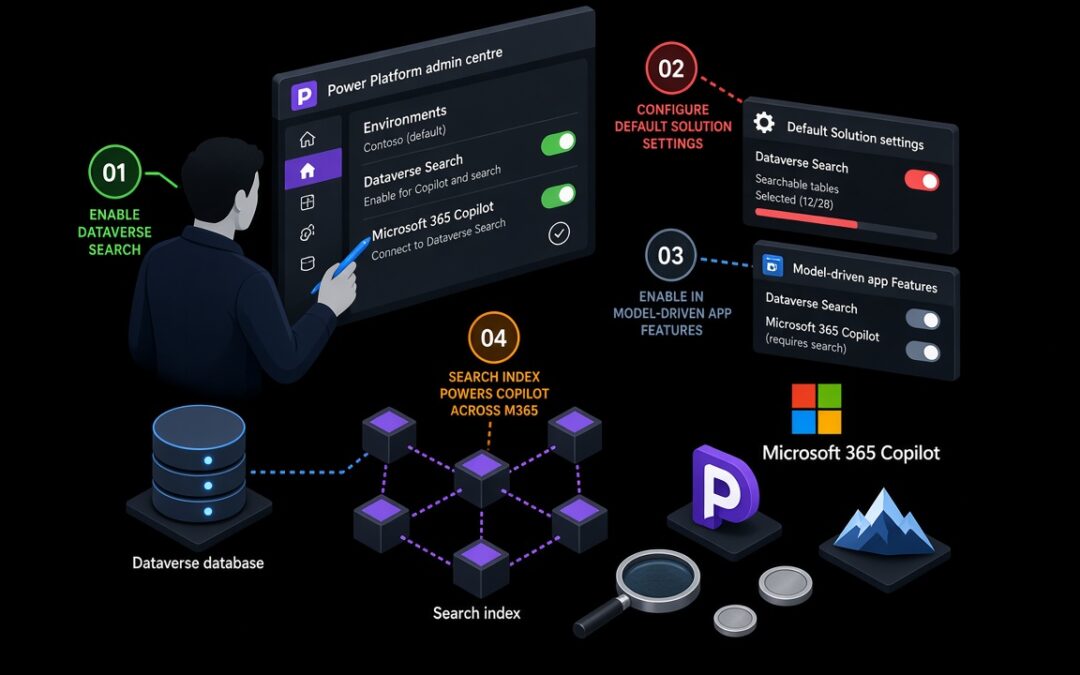
If Microsoft 365 Copilot in a model-driven app feels half-baked, the problem is usually not the Copilot switch. Chat sits on Dataverse Search. When the index is off, thin, or eating capacity you do not have, you get vague answers even though the feature flag says On.
Here is what we actually check before telling a CE team the chat is “ready”.
The admin centre and the app both matter
In the Power Platform admin centre, set Dataverse search so indexing supports Copilot / AI experiences (Default or On), and confirm the tenant allows Dataverse data in Microsoft 365 Copilot. Then turn on M365 Copilot under Copilot settings for that environment or environment group.
That alone is not enough. Either open the model-driven app, set M365 Copilot in model-driven apps to On under Features, and publish — or set the Default Solution value Enable M365 Copilot in model-driven apps to 2 so new apps pick it up. Skip one of those layers and users never see Chat.
Where the index usually bites
Open a solution Overview, then Dataverse search → Manage search index. There is no hard table limit, but the organisation caps out at 1,000 searchable fields (about 50 are already reserved). Lookups cost three slots; option sets cost two. The Quick Find view for each table drives what goes into the index and what shows in results — filter operators Dataverse Search does not support are simply ignored.
Custom tables are not indexed until you opt them in, with change tracking and “Appear in search results” on. Small config changes can take around fifteen minutes to surface. Turn search off for more than about twelve hours and the index is gone; bringing it back means a full sync that can run for hours on a normal tenant and days on a large one.
Capacity and licences before you widen the net
Dataverse Search shows up as DataverseSearch (it used to be called RelevanceSearch) on the Capacity reports. Download the search index usage report by table if you need to prune. Power Apps users still need a premium licence plus Microsoft 365 Copilot. Dynamics 365 Enterprise or Premium covers Copilot inside the D365 app; you still need an M365 Copilot licence for the fuller Work IQ experience beyond Dataverse grounding.
And set expectations: today this chat is read-only against Dataverse. Writes need a customised agent. It is not available in the Power Apps mobile app either.
A sensible order of work
Confirm you have capacity headroom, enable search and the tenant Dataverse-in-Copilot setting, then index Account, Contact, Lead, Opportunity and Case Quick Finds before you touch custom tables. Enable M365 Copilot on one app, pilot with a small licensed group, and only then retire the older App Skills chat. Trying to do all of that in one afternoon is how you burn a week of sync time.
Microsoft’s docs are worth keeping open while you do it: configure Dataverse search and add Microsoft 365 Copilot.