
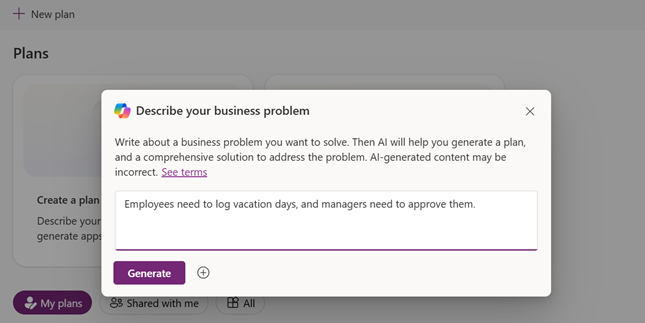
Plans in Power Apps is a Copilot-first starting point for new Power Platform solutions. Rather than opening a blank table designer, you describe the business problem in plain language, for example “Employees need to log leave and managers need to approve it”. You can also attach process diagrams, data models or screenshots of a legacy app. Plans is generally available and switched on by default in environments with a Dataverse database. It can only be turned off by a tenant admin through Microsoft Support, so it’s worth knowing it’s there before your makers find it.
How a plan is built
The plan is built in stages by three plan agents. The Requirement Agent drafts user roles and their needs. The Data Agent proposes Dataverse tables with columns, data types and relationships. The Solution Agent then recommends the components to build: canvas or model-driven apps, Power Pages sites, Power Automate flows, Power BI reports or Copilot Studio agents. Each stage stops at a “Looks good” checkpoint. There you can edit inline or ask Copilot for changes (for example “add an HR admin role that monitors leave across teams”) before moving on. Selecting the data model opens the full data workspace with an ERD-style diagram, so you can review the schema properly instead of accepting it blindly.
Solution-aware from the start
For Dynamics 365 CE and Power Platform teams, the useful part is that Plans is solution-aware. When you select Save tables, you name a solution and choose a publisher, or pick an existing solution, so everything the plan generates lands somewhere you can manage with your normal ALM. Set the publisher prefix deliberately here rather than ending up with defaults. Plans can be shared as Viewer or Co-Owner. Only one author can edit at a time, though up to 100 can view. Plans can also be exported to PDF, which suits requirements sign-off with stakeholders who don’t have Power Apps access.
What to review before you save
Treat Plans as an accelerator for discovery and first-cut design, not a replacement for solution architecture. Review the generated tables against what already exists in your CE environment (accounts, contacts, cases) before you create duplicates. Check security roles: makers need specific plan privileges, and environment makers are redirected to their own developer environment when they save tables. Used that way, Plans can turn a workshop conversation into a reviewable data model and app proposal in an afternoon.